I still remember the day I decided to launch my first website. It was a mix of excitement and, if I’m being honest, sheer terror. I had the idea, the passion, and a half-decent logo I’d cobbled together. But then I hit a wall, a big, technical-sounding wall called ‘web hosting’. What on earth was it? Shared, VPS, dedicated, cloud… it felt like a different language. I spent weeks, and I mean *weeks*, tumbling down rabbit holes of conflicting advice, getting more confused with every forum post I read. It was paralyzing. I almost gave up. Look, choosing a web host feels like one of those monumental decisions that can make or break your online dreams, and the truth is, it kind of is. Your web host is the invisible foundation of your entire online presence. Pick the wrong one, and you’re in for a world of slow-loading pages, frustrating downtime, and non-existent support. Pick the right one, and you’ve got a silent partner working 24/7 to keep your site fast, secure, and online. That’s why I’ve put together this ultimate **web hosting guide** for 2026. I’ve poured years of experience—the good, the bad, and the ugly—into this single resource. We’re going to cut through the jargon, demystify the options, and give you the confidence to choose the perfect web hosting for your project without wanting to throw your computer out the window. Let’s get started. For more information, see our guide on Best WordPress Hosting in 2026: The Definitive Com. For more information, see our guide on Web Hosting Customer Support: What to Look For in .
Table of Contents
- What is Web Hosting and Why is it the Bedrock of Your Website?
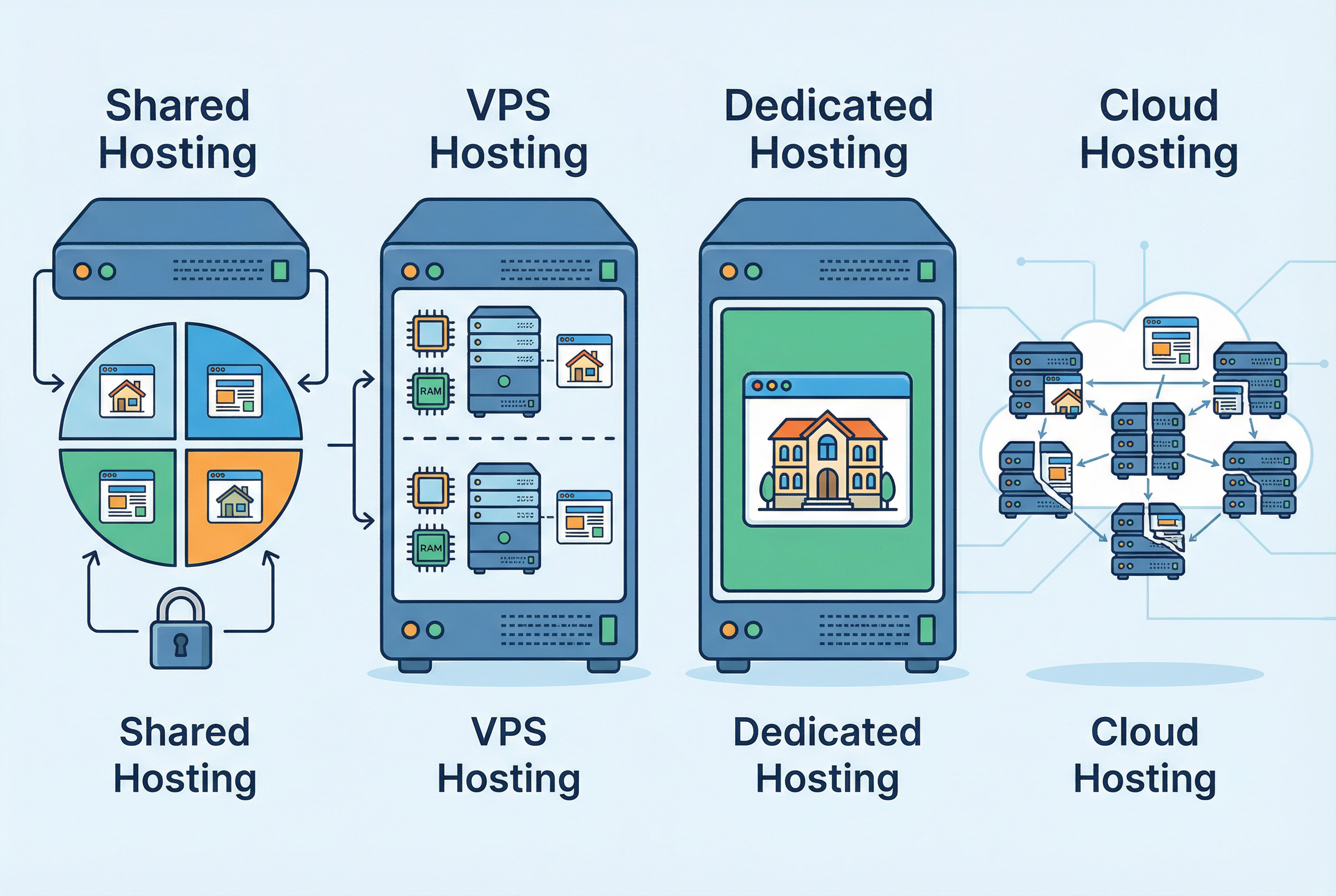
- The Main Types of Web Hosting: A Web Hosting Guide to Your Options
- Web Hosting Comparison: Shared vs. VPS vs. Dedicated vs. Cloud
- How to Choose the Best Web Hosting for Your Needs
- Web Hosting for Beginners: Our Top Recommendations for 2026
- Frequently Asked Questions (FAQ)
- References & Sources
What is Web Hosting and Why is it the Bedrock of Your Website?
Alright, let’s get right to it. What *is* web hosting? Forget the technical mumbo-jumbo for a second. Imagine you’ve built a beautiful house. You’ve designed every room, painted the walls, and filled it with your favorite things. Now, where does this house live? It needs a piece of land, right? An address where people can find it. Web hosting is that piece of land for your website. It’s a service that provides the technology and space needed for your website to be viewed on the internet. Without it, your website is just a collection of files on your computer that nobody else can see.
Demystifying the Core Concepts: Servers, Data Centers, and Your Website’s Home
When you sign up for a web hosting service, you’re essentially renting a small slice of a very powerful computer called a **server**. This isn’t like your desktop or laptop; these are high-performance machines designed to run 24/7, 365 days a year. They store all your website’s files – the text, the images, the videos, the code, everything. These servers live in specialized facilities called **data centers**. Think of a data center as a high-security, climate-controlled apartment building for servers. They have redundant power supplies, super-fast internet connections, and top-notch security to ensure those servers (and your website) are always up and running. So, when someone types your website address (like www.webhostadvize.com) into their browser, their computer sends a request to your server in its data center. The server then ‘serves’ up your website’s files, and voilà, your site appears on their screen. It sounds complex, but it happens in the blink of an eye. It’s the magic that makes the internet work.
The “Renting vs. Owning” Analogy: Making Web Hosting Easy to Understand
I’ve found the best way to explain web hosting to friends and family is the ‘renting vs. owning’ analogy. Think about it this way:
- Shared Hosting is like renting an apartment in a large building. You have your own space, but you share resources like the building’s water, electricity, and maintenance with all the other tenants. It’s affordable and convenient, but if one tenant throws a massive, noisy party (i.e., their website gets a huge traffic spike), it can affect everyone else.
- VPS Hosting is like owning a townhouse or a condo. You still share the land and some common infrastructure, but you have much more control over your own unit. You have dedicated resources and your neighbors’ activities have far less impact on you. It’s a step up in price and responsibility.
- Dedicated Hosting is like owning your own house with its own land. You have complete control, all the resources are yours, and you can do whatever you want with the property. It offers the best performance and security, but it’s also the most expensive and requires the most maintenance.
This analogy really helps put the different types of hosting into perspective, especially when you’re just starting out. We’ll dive deeper into each of these in a bit, but for now, just remember that you’re essentially choosing the right kind of ‘property’ for your website to live on.
How Does Web Hosting *Actually* Work? From Domain Name to Live Site
So, you’ve got your domain name (your website’s address) and you’ve chosen a hosting plan. How do they connect? It’s a process that involves something called the Domain Name System, or DNS. Honestly, you don’t need to be an expert in this, but understanding the basics is helpful. Think of the DNS as the internet’s phonebook. When you buy a domain name, you need to tell it where your website’s ‘house’ is located. You do this by pointing your domain’s ‘nameservers’ to your web host. Your web host will give you these nameserver addresses when you sign up – they usually look something like `ns1.yourhost.com` and `ns2.yourhost.com`.
Once you’ve updated your nameservers (which can take a few hours to propagate across the internet), the magic happens. Now, when someone types your domain into their browser:
- Their browser asks the DNS, “Hey, where can I find this website?”
- The DNS looks up your domain, finds the nameservers you set, and says, “Ah, that website lives on the servers at this IP address.”
- The browser then connects to that server and requests the website’s content.
- The server gathers up all the files and sends them back to the browser, which then displays your beautiful website.
And that, in a nutshell, is how web hosting brings your website to life. It’s the unsung hero of the internet, the digital landlord that keeps your online presence safe and sound. Now that you’ve got the fundamentals down, let’s explore the different types of hosting you can choose from. This is where the fun really begins!
The Main Types of Web Hosting: A Web Hosting Guide to Your Options
Okay, so you understand the ‘what’ and the ‘why’. Now for the ‘which’. Choosing the right type of hosting is probably the single most important decision you’ll make in this process. It’s like choosing the right engine for your car. A moped engine won’t cut it for a Formula 1 race, and a jet engine is overkill for a trip to the grocery store. Let’s break down the main options in this **web hosting guide** so you can find the perfect fit.
Shared Hosting: The Budget-Friendly Choice for Beginners
This is where almost everyone starts, and for good reason. Shared hosting is the most affordable option on the market, often costing just a few dollars a month. Remember our apartment analogy? That’s shared hosting. You and hundreds, sometimes thousands, of other websites are all living on the same server, sharing its resources (like CPU power, RAM, and disk space). It’s a fantastic entry point and one I recommend to anyone just dipping their toes into the world of websites. In fact, for those just starting, our guide on the best web hosting for beginners can be a great next step.
- Pros: Incredibly cheap, very easy to use (most hosts offer a control panel like cPanel), and requires zero technical maintenance on your part. The hosting company handles all the server management, security updates, and backend stuff.
- Cons: The biggest drawback is the “noisy neighbor” effect. If another website on your shared server suddenly gets a massive surge in traffic or gets hacked, it can slow down or even crash your site. You also have limited resources and less control over the server environment.
- Who is it for? New websites, personal blogs, small business brochure sites, and anyone on a tight budget. If you’re expecting low to moderate traffic, shared hosting is a perfect starting point.
VPS (Virtual Private Server) Hosting: The Sweet Spot of Power and Price
Now, let’s say your website is taking off. Your traffic is growing, you’re adding more features, and your shared hosting plan is starting to feel a bit cramped. It’s time to upgrade to a VPS. A VPS is still technically a shared environment—one physical server is partitioned into several *virtual* servers—but the experience is completely different. It’s like moving from that crowded apartment building to a townhouse. You have your own dedicated resources (a guaranteed amount of CPU and RAM), more control, and much better performance because you’re not directly sharing resources with your neighbors. For a deeper dive, comparing shared hosting vs VPS for WordPress can provide more specific insights.
- Pros: Significantly better performance and security than shared hosting. You get dedicated resources, root access (which gives you more control to install custom software), and it’s highly scalable. You can often increase your resources with just a few clicks.
- Cons: It’s more expensive than shared hosting, and it requires a bit more technical know-how. While many hosts offer “managed” VPS plans that handle the technical side for you, an “unmanaged” plan means you’re responsible for server maintenance and security.
- Who is it for? Growing websites, small to medium-sized businesses, e-commerce stores, and anyone who needs more power and control than shared hosting can offer.
Dedicated Server Hosting: The Ultimate in Power and Control
This is the big leagues. With dedicated hosting, you’re not renting an apartment or a townhouse—you’re renting the entire building. You get a whole physical server all to yourself. All of its resources are 100% dedicated to your website. This means incredible performance, rock-solid security, and complete control over every aspect of the server environment. You can install any software you want, configure it exactly to your specifications, and never have to worry about another website affecting yours.
- Pros: Unmatched performance, security, and control. You have the entire server’s resources at your disposal. It’s the most powerful hosting option available.
- Cons: It’s expensive. We’re talking hundreds of dollars per month. It also requires significant technical expertise to manage. You are the system administrator, responsible for everything from security patches to software updates.
- Who is it for? High-traffic websites, large e-commerce stores, enterprise-level businesses, and applications that have very specific server requirements. If you have a mission-critical website that can’t afford any downtime or performance hiccups, dedicated hosting is the way to go.
Cloud Hosting: Scalability and Flexibility for Growing Businesses
Cloud hosting is the new kid on the block, and honestly, it’s a bit of a game-changer. Instead of your website living on a single server, it’s hosted on a network of interconnected servers (the “cloud”). This has some incredible advantages. The biggest one is scalability. If your website suddenly gets featured on the news and your traffic explodes, a cloud hosting platform can automatically allocate more resources to handle the load. There’s no single point of failure; if one server goes down, another one seamlessly takes over. It’s like having a team of servers ready to jump in and help whenever needed. For small businesses looking to leverage this, exploring the best cloud hosting providers is a wise move.
- Pros: Incredible scalability and reliability. You typically only pay for the resources you use. It offers excellent performance and uptime.
- Cons: The pricing can be a bit unpredictable since it’s often based on usage. It can also be more complex to configure than traditional hosting, though many providers are making it much more user-friendly.
- Who is it for? Businesses of all sizes, from startups to large enterprises. It’s especially great for websites with fluctuating traffic, e-commerce sites, and anyone who needs high availability and the ability to scale on demand.
Managed WordPress Hosting: A Hands-Off Approach for WordPress Users
If you know you’re going to be using WordPress (and let’s be honest, a huge chunk of the web does), then managed WordPress hosting is something you should seriously consider. This is a specialized type of hosting where the entire server environment is optimized specifically for WordPress. The hosting company takes care of everything for you: WordPress updates, security, daily backups, and performance optimization. It’s like having a team of WordPress experts on call 24/7. When comparing high-end options, a look at WP Engine vs Kinsta shows just how powerful this type of hosting can be.
- Pros: Blazing-fast performance, top-notch security, and expert support. It’s a completely hands-off experience, allowing you to focus on creating content rather than managing your website.
- Cons: It’s more expensive than shared hosting, and you have less flexibility. You can typically only install plugins from the WordPress repository, and you have less control over the server itself.
- Who is it for? Anyone with a WordPress website who values performance, security, and peace of mind. If you’re not a technical person and you just want your WordPress site to run as fast and securely as possible, managed hosting is worth every penny.

Web Hosting Comparison: Shared vs. VPS vs. Dedicated vs. Cloud
I get it. The different hosting types can still feel a bit abstract. Sometimes, you just need to see things laid out side-by-side. Let’s do a direct **web hosting comparison** to make the differences crystal clear. This is where we move from theory to practical application in our **web hosting guide**.
Comparison Table 1: Feature and Resource Comparison
Think of this table as the spec sheet for your website’s potential new home. We’re looking at the raw resources and capabilities you get with each hosting type. This is the nitty-gritty that directly impacts your site’s performance and what you can do with it.
| Feature | Shared Hosting | VPS Hosting | Dedicated Hosting | Cloud Hosting |
|---|---|---|---|---|
| Performance | Basic (Affected by others) | Good (Guaranteed resources) | Excellent (All resources are yours) | Excellent (Scalable resources) |
| Security | Basic (Shared environment risk) | Good (Isolated environment) | Excellent (Total control) | High (Redundant & distributed) |
| Control/Customization | Low (Limited by host) | Medium (Root access often available) | Full (Complete server control) | High (Control over virtual instances) |
| Scalability | Low (Need to upgrade plan) | Medium (Can add resources easily) | Low (Requires new hardware) | High (Seamless, on-demand scaling) |
| Price | $ (Very Cheap) | $$ (Affordable) | $$$$ (Expensive) | $$$ (Pay-as-you-go) |
| Technical Skill Needed | None | Basic to Intermediate | Advanced | Intermediate to Advanced |
How to Choose the Best Web Hosting for Your Needs
Here’s the thing: there is no single “best” web host. There’s only the best web host *for you*. It’s a personal decision that depends entirely on your specific needs, budget, and technical comfort level. I’ve seen people spend a fortune on dedicated servers they didn’t need, and I’ve seen businesses grind to a halt because they cheaped out on a $2/month shared plan. This part of our **web hosting guide** is all about self-assessment. Let’s walk through the process of making the right choice, step-by-step.
Step 1: Define Your Website’s Purpose and Goals
Before you even look at a single hosting plan, take a step back and ask yourself some fundamental questions. Be honest with your answers.
- What kind of website are you building? Is it a simple blog? A portfolio to showcase your work? A complex e-commerce store with thousands of products? A membership site? The type of site dictates the resources you’ll need.
- What’s your expected traffic? Are you expecting a few dozen visitors a day, or are you planning a marketing blitz that could bring in thousands? Be realistic, but also think about your growth potential.
- What’s your budget? How much are you comfortably willing to spend per month? Remember to factor in those introductory prices vs. renewal rates.
- What’s your technical skill level? Are you comfortable with server management, or does the thought of a command line make you break out in a cold sweat?
Your answers to these questions will immediately start to narrow down your options. A simple blog with low traffic? Shared hosting is probably fine. A growing e-commerce store? You should be looking at VPS or Cloud hosting. An excellent resource for new businesses is our guide on the best web hosting for small businesses, which can help align your goals with the right hosting type.
Step 2: Understanding Key Features: What Really Matters?
Hosting company websites are a minefield of marketing terms and technical specs. It’s easy to get overwhelmed. I’ve been doing this for years, and I still have to roll my eyes at some of the claims. Let’s cut through the noise and focus on the features that genuinely matter.
- Uptime (and why 99.9% is the magic number): Uptime is the percentage of time your website is online and accessible. It’s the single most critical metric. Even a few hours of downtime can mean lost revenue and frustrated visitors. Look for a host that guarantees at least 99.9% uptime. Anything less is unacceptable. And honestly, don’t just take their word for it; look for independent reviews and uptime monitoring tests.
- Speed and Performance (Core Web Vitals): In 2026, speed is everything. A slow-loading website will kill your conversion rates and your search engine rankings. Google’s Core Web Vitals are a set of metrics that measure user experience, and they are heavily influenced by your hosting. Look for hosts that offer SSD storage (Solid State Drives), have servers located close to your target audience, and have a good reputation for speed.
- Security Features (SSL, Firewalls, Malware Scans): Website security is not optional. A good host will provide a free SSL certificate (which enables the `https://` on your site), robust firewalls, and regular malware scanning. Don’t even consider a host that charges extra for an SSL certificate in this day and age. For those on shared plans, understanding the specifics of shared hosting security is crucial.
- Customer Support (24/7 Live Chat is a must!): Here’s a pro tip: something *will* go wrong. It’s inevitable. And when it does, you want to know that you can get help immediately. I will not sign up with a host unless they offer 24/7 live chat support. Phone support is great, and a ticket system is fine for non-urgent issues, but when your site is down at 2 AM, you want to be able to talk to a real person, right now.
- Scalability and Future-Proofing Your Choice: Your website should grow. Your hosting should be able to grow with it. Choose a host that makes it easy to upgrade your plan as your traffic and needs increase. The last thing you want is to have to migrate your entire website to a new host just because you’ve become successful.
Step 3: Decoding Pricing: Uncovering Hidden Fees and Renewal Costs
Ah, hosting prices. The land of the giant asterisk. You’ll see ads for hosting that costs less than a cup of coffee per month. But here’s the catch: that’s almost always an introductory price for a long-term contract. When it comes time to renew, that price can jump by 200-300%. It’s a classic bait-and-switch, and it catches so many people off guard.
When you’re comparing prices, always, *always* look for the renewal rate. It’s usually in the fine print. Also, be on the lookout for hidden fees. Some hosts will charge extra for things like backups, email accounts, or even basic security features. A good host will be transparent about their pricing. I’ve learned to be very skeptical of any deal that seems too good to be true. It usually is.
My Personal Checklist for Vetting a Web Host
Over the years, I’ve developed a mental checklist that I run through before I even consider a hosting provider. It’s served me well, and I want to share it with you.
- Does their website look professional and load quickly? If their own site is slow and clunky, what does that say about their hosting?
- Do they offer a 30-day (or longer) money-back guarantee? This shows they’re confident in their service.
- What do recent, independent reviews say? I’m not talking about the testimonials on their own site. I’m talking about reviews on sites like Trustpilot, Reddit, and independent hosting review blogs.
- I test their support. Before I sign up, I’ll open a live chat with a pre-sales question. How quickly do they respond? Are they helpful and knowledgeable? This is a huge indicator of the support you’ll receive as a customer.
- Do they have a clear and easy-to-understand pricing structure? I want to know exactly what I’m paying for, both now and in the future.
Choosing a web host doesn’t have to be a shot in the dark. By following these steps and doing your homework, you can make an informed decision that will set your website up for success for years to come.
Web Hosting for Beginners: Our Top Recommendations for 2026
If you’re just starting out, the sheer number of hosting providers can be overwhelming. To make things easier, I’ve put together a short list of hosts that I consistently recommend to friends and clients who are new to the game. This isn’t an exhaustive list, but it’s a great starting point for anyone looking for reliable, affordable, and user-friendly hosting. This is the practical advice section of our **web hosting for beginners** guide.
Comparison Table 2: Top 3 Web Hosts for Beginners
Let’s put my top picks for beginners head-to-head. We’ll look at the factors that matter most when you’re just starting out: ease of use, performance, support, and of course, price. Remember to check out our detailed SiteGround vs HostGator comparison for a deeper analysis of two of these popular choices.
| Host | Ease of Use | Performance | Support | My Personal Take |
|---|---|---|---|---|
| Hostinger | Excellent (Custom hPanel is very intuitive) | Good (Great value for the price) | Good (24/7 Live Chat) | Honestly, for the price, it’s hard to beat Hostinger. Their interface is clean and simple, and they offer a ton of features even on their cheapest plans. It’s my go-to recommendation for anyone on a tight budget. Check out my full Hostinger review for the nitty-gritty details. |
| SiteGround | Excellent (User-friendly custom dashboard) | Excellent (Known for great speed and uptime) | Excellent (Top-tier, fast, and knowledgeable) | SiteGround is a step up in price, but you get what you pay for. Their performance is consistently fantastic, and their support is arguably the best in the shared hosting space. If you have a bit more to spend and you value speed and support above all else, SiteGround is a phenomenal choice. Our 2026 SiteGround review has the latest performance data. |
| Bluehost | Very Good (Classic cPanel with a guided setup) | Good (Solid and reliable performance) | Good (24/7 support via chat and phone) | Bluehost is one of the most well-known names in hosting, and they are officially recommended by WordPress.org. Their setup process is incredibly beginner-friendly, making them a great choice for first-timers. While their performance might not always match SiteGround’s, they offer a great all-around package. See how they stack up in our Bluehost shared hosting review. |

Frequently Asked Questions (FAQ)
I get asked a lot of the same questions about web hosting, so I wanted to tackle some of the most common ones right here. This should help clear up any lingering confusion.
1. Can I host my own website?
Technically, yes, you can. You could turn a computer at your home into a server. But honestly, it’s a terrible idea for 99.9% of people. You’d be responsible for maintaining the hardware, ensuring 24/7 internet connectivity and power, and handling all the security. It’s far more expensive and complicated than just using a hosting service. I tried it once, years ago. It was a fun experiment for about a week, and then it became a massive headache.
2. How much does web hosting cost?
It varies wildly. Shared hosting can be as cheap as $2-$3 per month for an introductory period, with renewal rates around $10-$15 per month. VPS hosting typically starts around $20-$30 per month and can go up from there. Dedicated servers are usually $100+ per month. Remember to always check the renewal rates, not just the initial price.
3. Do I need a domain name to have a website?
Yes. The domain name is your website’s address (e.g., `google.com`). The web hosting is the house where your website lives. You need both. Many hosting providers offer a free domain name for the first year when you sign up for a hosting plan, which is a great perk for beginners.
4. What is the difference between web hosting and a website builder?
Web hosting is the service that stores your site’s files and makes them accessible online. A website builder (like Wix or Squarespace) is a tool that helps you create the website itself, usually with a drag-and-drop interface. Most website builders are all-in-one platforms that include hosting, so you don’t need to buy it separately. This guide focuses on self-hosted websites, where you have more control and flexibility.
5. How much bandwidth and storage do I need?
For beginners, you almost never have to worry about this. Most entry-level shared hosting plans offer “unlimited” or “unmetered” bandwidth and storage. While not truly unlimited (there are always fair use policies), the resources they provide are more than enough for 99% of new websites. You’ll likely outgrow other aspects of the plan (like performance) long before you hit these limits.
6. Can I switch web hosts later?
Absolutely. You can migrate your website from one host to another at any time. It can be a bit of a technical process, but many hosting providers offer free migration services to make it easier for new customers to switch over. Don’t feel like you’re locked into your first choice forever.
7. What is cPanel?
cPanel is the most popular web hosting control panel. It’s a graphical interface that makes it easy to manage your hosting account. From cPanel, you can do things like create email accounts, manage your files, install WordPress, and check your resource usage. It’s the industry standard, and most shared hosting providers use it.
8. Do I need to know how to code to use web hosting?
Not at all! Especially with shared hosting and a tool like WordPress, you can build and manage a professional website without ever looking at a single line of code. Modern control panels and one-click installers for content management systems (CMS) like WordPress have made web hosting accessible to everyone, regardless of their technical skills.
References & Sources
- IBM – What is Web Hosting?
- Amazon Web Services – What is Web Hosting?
- GoDaddy – What is web hosting? Complete guide for beginners
- HostGator – Starting a Website for Beginners
- Wix – How to Create a Website From Scratch in 10 Steps